Data & PythonMacroeconomics
Machine Reading IMF Data: Data Retrieval with Python (2025 Update)
Update (2025): The IMF API has changed significantly. This post has been completely rewritten to use the new SDMX-based API and the sdmx1 Python library, replacing the old JSON REST approach. The underlying data is the same—only the access method has changed.
The IMF’s data portal provides access to macroeconomic data covering more than 180 countries. With Python’s sdmx1 library, retrieving this data programmatically is straightforward.
In this post, I’ll walk through retrieving trade data from the IMF, building up to a comparison of how the United States, China, and Japan’s shares of world exports have shifted over the past 75 years.
Setup
First, install the sdmx1 library:
Step 1: Connect to the IMF API
The IMF provides data through an SDMX endpoint. SDMX (Statistical Data and Metadata eXchange) is a standard format used by many statistical organizations—including the World Bank, ECB, and OECD—so the skills you learn here transfer to other data sources.
We create a client to access the IMF’s endpoint:
Step 2: Find Available Datasets
The IMF organizes its data into datasets (called “dataflows” in SDMX terminology). The dataflow() method returns all available datasets. We can search for trade-related data:
Output:
The ITG dataset contains country-level export and import values—exactly what we need for our first example.
Step 3: Examine Dataset Structure
Before we can request data, we need to understand how the dataset is organized. Each dataset has dimensions—think of these as columns in a database. Each unique combination of dimension values identifies a specific time series.
Output:
So to request data from ITG, we need to specify: which country, which indicator, what transformation (units), and what frequency.
Step 4: Find Valid Codes
Each dimension has a codelist defining valid values. Let’s explore what’s available.
For indicators:
Output:
The transformation codes tell us the units and valuation method:
Output:
FOB (Free on Board) is the value at the exporter’s border; CIF (Cost, Insurance, Freight) includes shipping costs to the importer. For exports, FOB is standard.
We can also search for country codes:
Output:
Step 5: Construct the Data Request
Now that we know the valid codes, we can construct a “key” to request specific data. The key format for ITG is: COUNTRY.INDICATOR.TRANSFORMATION.FREQUENCY
For US annual exports in US dollars:
Breaking this down:
USA= United States (country code)XG= Exports of goods (indicator)FOB_USD= Free on board, US dollars (transformation)A= Annual (frequency)
Step 6: Retrieve the Data
With our key constructed, we call the .data() method to fetch the data, then use sdmx.to_pandas() to convert it to a familiar pandas DataFrame:
Output:
Step 7: Prepare for Analysis
The data comes with string time periods (like “2024”). We convert the index to proper datetime objects for plotting, and scale the values to billions for readability:
Step 8: Visualize
With the data in hand, we can create a simple visualization:
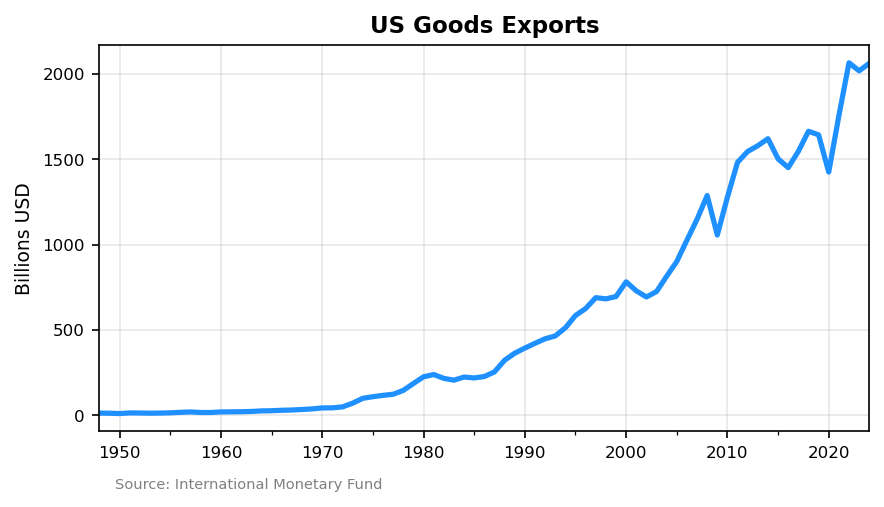
US goods exports have grown from under $15 billion in 1948 to over $2 trillion today.
Step 9: Combining Datasets for Comparative Analysis
So far we’ve worked with a single dataset. But real-world analysis often requires combining data from multiple sources.
To calculate each country’s share of world exports, we need world totals. The ITG dataset has country-level data, but world aggregates live in the IMTS dataset (International Trade in Goods by partner country). IMTS includes aggregate trade flows using G001 (World) as both the reporting country and counterpart. This separation is common in statistical APIs—different datasets serve different purposes.
You can request multiple countries in a single call by joining codes with +:
Combine and calculate shares:
Step 10: The Big Picture
Finally, we can visualize how global trade has shifted over 75 years:
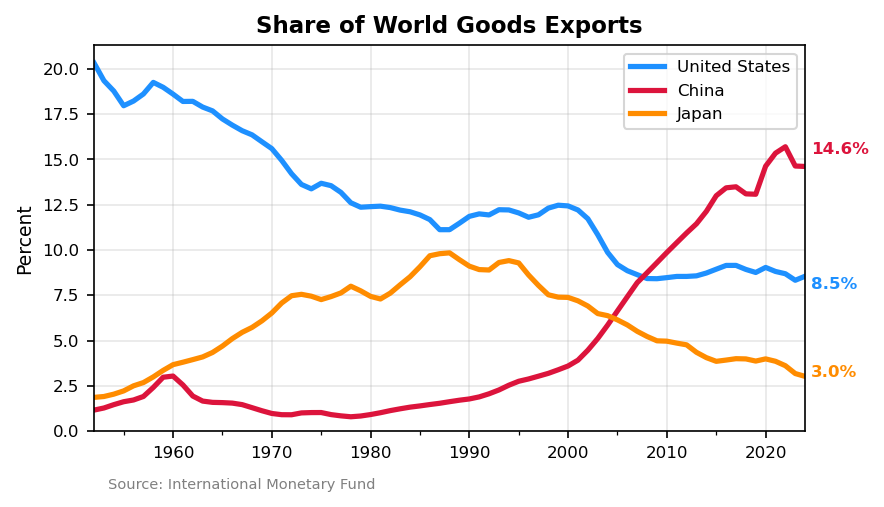
The chart reveals the dramatic shift in global trade over 75 years:
- United States declined from ~20% of world exports in 1950 to 8.5% today
- China rose from near zero to 14.6%, surpassing the US around 2007
- Japan peaked at ~10% during its 1980s boom, then fell to 3%
Step 11: Export to CSV
To make the data available for use in other tools—Excel, R, or any application that reads CSV files:
Summary
The workflow for accessing IMF data:
- Connect:
sdmx.Client('IMF_DATA') - Find datasets:
dataflow()and search by name - Get structure: Check
dimensions.componentsfor the key format - Find codes: Use
codelistto look up valid values - Build key: Join dimension values with dots (e.g.,
USA.XG.FOB_USD.A) - Retrieve:
.data('DATASET', key='...') - Convert:
sdmx.to_pandas()for analysis
Next Steps
Part 2 covers where former IFS data now lives after the 2025 restructuring, with examples using the new topic-specific datasets.
Resources
- sdmx1 on PyPI – Installation and documentation
- sdmx1 documentation – Full library reference
- IMF Data Portal – Browse datasets interactively
- BD Economics IMF API Guide – Extended version with additional examples